
Solutions · Trace Platform
Track it. Ship it. Control it.
Know where your assets and shipments are, what’s happening, and when something needs attention. Trace brings tracking, trip management, sensor data, and automated alerts together in one easy-to-use platform.
Connect compatible tracking devices, manage your operations, and keep your team and customers informed.
Supports Queclink© and Digital Matter© devices, with integration options for other compatible hardware.
Starting at $8.95 per device/month
API Documentation
Read your Trace data from your own systems.
The Trace REST API gives your ERP, TMS, data warehouse or customer portal a read-only, JSON view of the same records your team sees in the app. Pull them on a schedule, join them to your own data, and leave Trace as the single source of truth.
Base URL
https://trace.verticalware.io/api/v1Full API reference
https://trace.verticalware.io/docs/api- Read-only
- JSON responses
- Times in ISO 8601 UTC
How the API behaves
Four rules cover every endpoint: send your key, page through lists, read the status code, and mind the rate limit.
Authentication
One key per integration
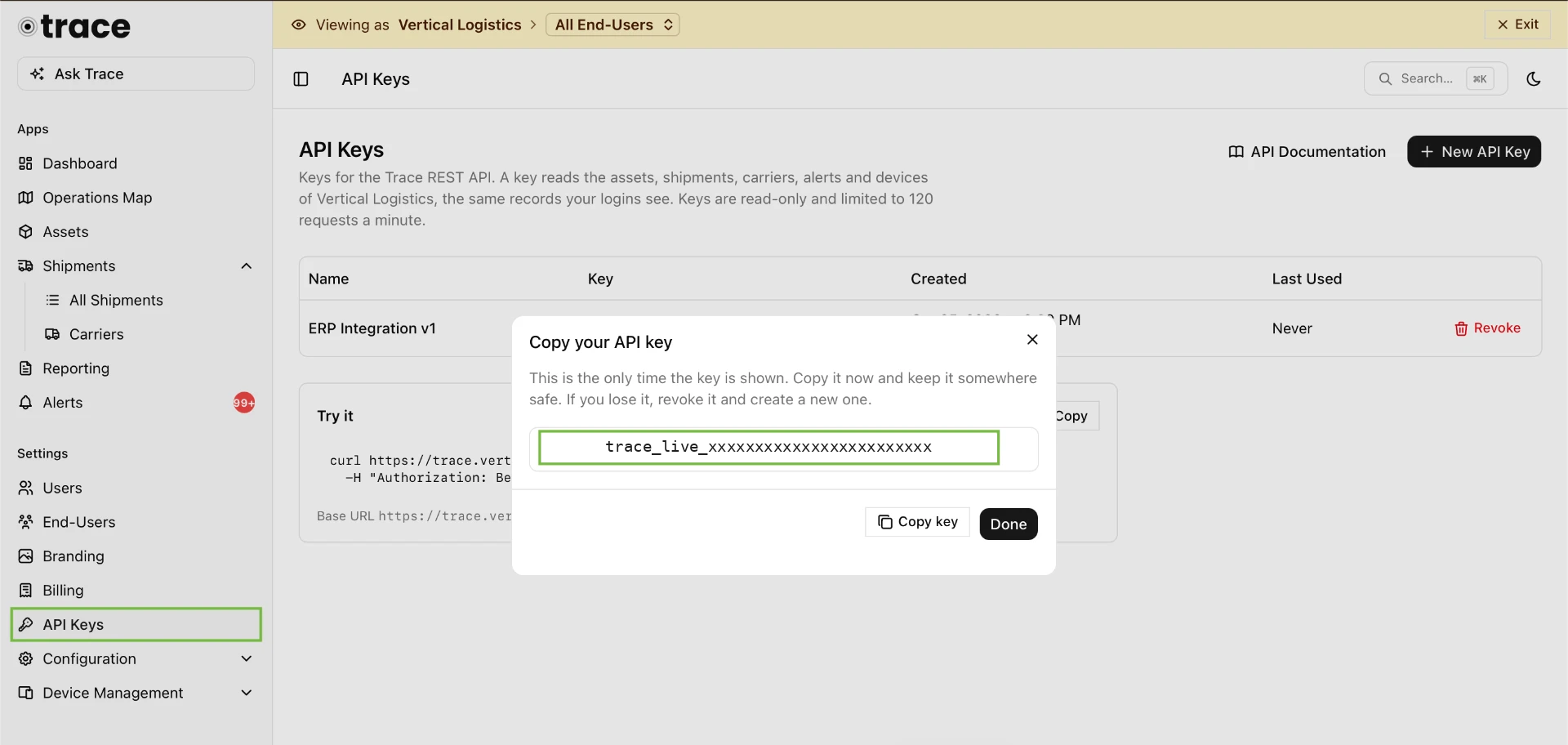
Create an API key in Trace under Settings → API Keys (account admins only). The key is shown once, so store it like a password and send it with every request in the Authorization header. A key belongs to your account and reads what that account's logins see: a customer key reads the customer's records, an End-User key reads only that End-User's. Revoke a key in Settings → API Keys and anything using it stops working right away.
Authentication
Authorization: Bearer trace_live_xxxxxxxxxxxxxxxxxxxxPagination
Walk lists a page at a time
Lists take page (from 1) and limit (up to 100, default 50). Records come back in data with a pagination block — keep asking for the next page while hasMore is true. Location history uses a cursor instead: pass the next value back as after until it comes back null.
Pagination
{ "pagination": { "page": 2, "limit": 50, "total": 137, "hasMore": true } }Errors
Standard status codes, plain messages
Errors use HTTP status codes with a human-readable message in detail.
- 400A parameter is invalid, e.g. a time that isn't ISO 8601.
- 401No API key, or the key is invalid or revoked.
- 403The account is suspended, or the app isn't enabled for it.
- 404No such record in your account.
- 422A parameter has the wrong type, e.g. limit=abc.
- 429Too many requests. Wait for the seconds in Retry-After.
Rate limits
120 requests a minute, per key
Each key can make 120 requests a minute, and every response says how many are left. Over the limit the API answers 429 with a Retry-After header in seconds, so a well-behaved job just waits and retries.
Rate limits
X-RateLimit-Limit: 120
X-RateLimit-Remaining: 117
Account
Check a key before you build
The account the API key belongs to: a customer, or one of a customer's End-Users. The fastest way to confirm a key works.
/api/v1/accountGet the account
Who the key belongs to, which apps the account has, and the key's rate limit.
Assets
Assets, live position and history
Trailers, containers, equipment and anything else you track. Each asset has a primary tracker and can have a backup tracker.
/api/v1/assetsList assets
All assets in the account, by asset number.
Query parameters
- searchstring
- Only assets whose name contains this text.
- deviceIdstring
- Only the asset with this tracker.
- typestring
- Only assets of this type, e.g. "20 Ft. Food Trailer".
- pageinteger
- Page number, starting at 1. Default 1.
- limitinteger
- Records per page, 1 to 100. Default 50.
/api/v1/assets/{id}Retrieve an asset
One asset by its id, with its current position, battery, temperature and custom fields.
/api/v1/assets/{id}/locationsAsset location history
Every position the asset's trackers reported while on the asset, oldest first.
Query parameters
- fromdatetime
- Only positions at or after this time (ISO 8601).
- todatetime
- Only positions at or before this time (ISO 8601).
- limitinteger
- Positions per call, 1 to 5000. Default 1000.
- afterstring
- The next value from the previous call, for the following positions.
Shipments
Shipments, legs and the road behind them
Loads moving from one place to another, in one or more legs. Needs the Shipments app. An End-User's key sees only the shipments where it is the customer.
/api/v1/shipmentsList shipments
All shipments, newest first. delayed is true when an open shipment is past its arrival time.
Query parameters
- statusstring
- Planned, In Transit, Delivered or Cancelled.
- searchstring
- Only shipments whose Shipment Number or Reference contains this text.
- pageinteger
- Page number, starting at 1. Default 1.
- limitinteger
- Records per page, 1 to 100. Default 50.
/api/v1/shipments/{id}Retrieve a shipment
One shipment with its legs and stops in order — each one Planned, In Progress or Completed.
/api/v1/shipments/{id}/locationsShipment location history
Every position reported while the shipment was running, oldest first.
Query parameters
- fromdatetime
- Only positions at or after this time (ISO 8601).
- todatetime
- Only positions at or before this time (ISO 8601).
- limitinteger
- Positions per call, 1 to 5000. Default 1000.
- afterstring
- The next value from the previous call, for the following positions.
Carriers
The carriers your loads move with
The trucking companies, railroads and forwarders the account ships with. Needs the Shipments app. An End-User's key sees the carriers that serve it.
/api/v1/carriersList carriers
All carriers, by name, with SCAC, DOT and MC numbers and dispatch contacts.
Query parameters
- searchstring
- Only carriers whose name contains this text.
- pageinteger
- Page number, starting at 1. Default 1.
- limitinteger
- Records per page, 1 to 100. Default 50.
/api/v1/carriers/{id}Retrieve a carrier
One carrier by its id.
Alerts
Alerts your own workflow can act on
Alerts raised by trackers and alert rules: geofences, temperature, battery, tampering and more. Needs the Alerts app. subject says what the alert is about: a shipment, an asset or a device.
/api/v1/alertsList alerts
Alerts, newest first. To collect new alerts, poll with since set to the time of your last call.
Query parameters
- acknowledgedboolean
- true for acknowledged alerts only, false for open ones only.
- severitystring
- info, warning or critical.
- sincedatetime
- Only alerts raised at or after this time (ISO 8601).
- untildatetime
- Only alerts raised at or before this time (ISO 8601).
- pageinteger
- Page number, starting at 1. Default 1.
- limitinteger
- Records per page, 1 to 100. Default 50.
/api/v1/alerts/{id}Retrieve an alert
One alert by its id, including where it fired and whether it has been acknowledged.
Devices
The trackers behind the records
The trackers in the account, with model, firmware, battery and the asset each one is currently on.
/api/v1/devicesList devices
All devices, by Device ID.
Query parameters
- searchstring
- Only devices whose Device ID, Friendly Name or IMEI contains this text.
- pageinteger
- Page number, starting at 1. Default 1.
- limitinteger
- Records per page, 1 to 100. Default 50.
/api/v1/devices/{id}Retrieve a device
One device, by its id or by its Device ID (IMEI or serial number).
/api/v1/devices/{id}/locationsDevice location history
Every position the device reported, oldest first. Works like asset location history.
Query parameters
- fromdatetime
- Only positions at or after this time (ISO 8601).
- todatetime
- Only positions at or before this time (ISO 8601).
- limitinteger
- Positions per call, 1 to 5000. Default 1000.
- afterstring
- The next value from the previous call, for the following positions.
Example
Your first call
Create a key, point curl at the assets list, and you have live positions, battery and temperature for every asset in the account. Everything else on this page follows the same shape.
Request
curl "https://trace.verticalware.io/api/v1/assets" \
  -H "Authorization: Bearer YOUR_API_KEY"
Response · 200
{
  "data": [
    {
      "id": "6712f0c4a1b2c3d4e5f60718",
      "assetNumber": 12,
      "name": "Food Trailer 12",
      "type": "16 Ft. Food Trailer",
      "status": "Active",
      "assetStatus": "Rented",
      "serialNumber": "1UFT16A12P0001234",
      "condition": "Good",
      "tags": ["texas"],
      "deviceId": "359746163544708",
      "location": {
        "latitude": 29.7604,
        "longitude": -95.3698,
        "address": "1200 Main St, Houston, TX 77002",
        "speed": 0,
        "heading": 180
      },
      "batteryLevel": 87,
      "temperature": 24.5,
      "lastReceivedAt": "2026-10-25T14:02:11+00:00",
      "customFields": { "VIN": "1UFT16A12P0001234" }
    }
  ],
  "pagination": { "page": 1, "limit": 50, "total": 1, "hasMore": false }
}
What comes back for an asset
- Name, type, status and asset status
- Serial number, condition and tags
- Primary tracker and backup tracker
- Latitude, longitude, address, speed and heading
- Battery level and temperature
- lastReceivedAt — when Trace got the report
- Custom fields such as VIN
- Site and End-User it belongs to
What teams do with it
The API reads, it never writes — nothing in Trace changes because of an API call. That keeps it safe to point at production from any job, report or portal.
Keep your ERP in step
Pull asset records and positions on a schedule so equipment master data, status and location match what's on the yard, without someone re-keying them.
Show live status to your customers
Feed shipment status, current position and carrier details into your own portal, so customers ask you less about where their load is.
Route alerts where work happens
Poll open alerts with since and raise critical ones into your service desk, paging tool or dispatch board the moment they fire.
Report across systems
Load assets, shipments, carriers and device health into your warehouse or BI tool and join them to orders, invoices and maintenance history.
The API is read-only and answers in JSON. Records a key can see are the records its account can see, so a customer key never reads another customer's data. The full reference, with every parameter and a worked example for each endpoint, lives at trace.verticalware.io/docs/api.
API Documentation
Plug Trace into the systems you already run
Tell us what needs to read from Trace and we'll help you scope it: keys, access levels, polling intervals and the fields your job actually needs.